Stopping Dynamic Actions using apex.da.cancelEvent

Update: Nick Buytaert wrote a follow-up article on the apex.da.resume function. I suggest reading it along with this article in case you need to resume a Dynamic Action (which is especially useful for plugins).
They're a few times when you may need to stop a Dynamic Action part way through the executing all its actions. Since individual actions don't have conditions associated with them there's no supported way to do this. Thankfully there's an undocumented JavaScript (JS) function called apex.da.cancelEvent. Here's an example of how to use it:
Suppose you have a page with two items, P1_X and P1_Y, and a button on P1. When the user clicks the button the Dynamic Action (DA) needs to set P1_X = X and P1_Y = Y. The DA setup will look like the following:

When you click the button P1_X and P1_Y are set to X and Y respectively.
Now suppose that after P1_X is set you wanted to stop all other actions in the DA (in this case setting P1_Y). There's no way to declaratively do this. Instead you must use the apex.da.cancelEvent function.
Add a new JavaScript True Action to the existing DA with sequence 15 (so its between the two other actions). In the code section use: apex.da.cancelEvent.call(this); Be sure to uncheck the Fire On Page Load option. The updated DA will look like image below (the new action is highlighted).
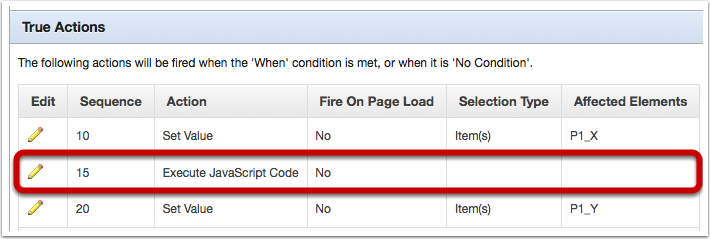
If you refresh P1 and click the button associated to this DA only P1_X will be set. The third action in this DA will not be executed.
The above example probably isn't the best use case for leveraging apex.da.cancelEvent however it does highlight its functionality. It is useful if you create your own custom confirm notice or some other process that determines if the rest of the actions in a DA can occur.
Note: You'll notice that I used the additional call() function when calling apex.da.cancelEvent in the action. Calling it defines the value of this in the function call as it is required in the cancelEvent function. For more information please read the JS call() documentation.